Bolt, Lovable, Replit, v0: All Four Get You to 70%. Here's Where Each One Stops.
Most people discussing AI tools at work are mixing up categories that solve different problems, and the vendors are not helping. Part one of a series sorting out the layers: what the four browser-based full-stack builders do, and the wall they all hit in the same place.
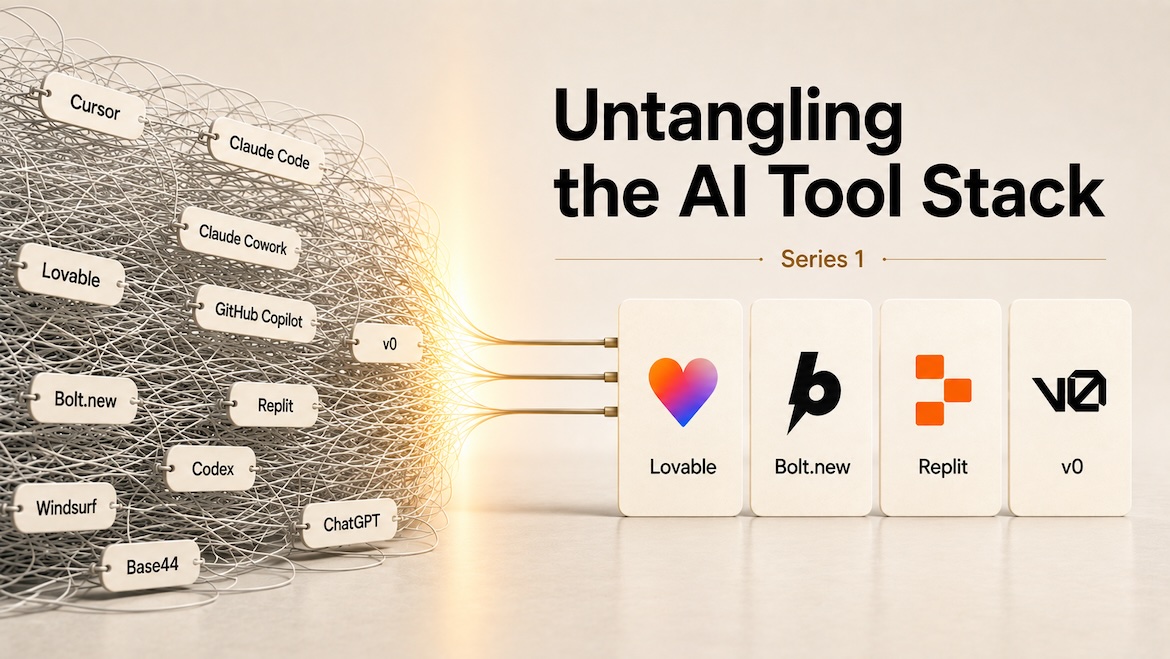
Sit through enough meetings and you will hear someone compare Cursor to Lovable, or ask why the team needs Claude Code when Replit already exists. The room nods along. Most of the people in it are not sure either.
Nobody should feel bad about this. AI tooling arrived as one undifferentiated category, and every vendor in it describes itself with the same six words. Someone reads a thread or watches a video that flattens four different products into a single demo, and walks away with a mental model that collapses the first time they have to defend a purchase in front of a CFO.
The categories underneath are real, though, and mixing them up costs money. A browser builder that spins up a deployed SaaS from a paragraph and a terminal agent that refactors a 400-file monorepo solve different problems. Comparing the two produces a verdict that is useless for both.
So we are writing a series to sort the layers out: what each class of AI coding tool does, who it is for, and where it stops being the right answer. Part one covers the browser-based full-stack builders: Bolt.new, Lovable, Replit, and v0 by Vercel.
They share an architecture. You type a prompt into a web page, an agent writes a React or Next.js app, a preview renders beside the chat, a managed backend gets wired in, and a deploy button puts it on the internet. No local environment, no terminal, no repo to clone.
That shared architecture produces a shared ceiling. All four are excellent at the first 70% of an app and expensive at the last 30%. The differences are in which 70% they nail and how gracefully they hand off when you run out of runway.
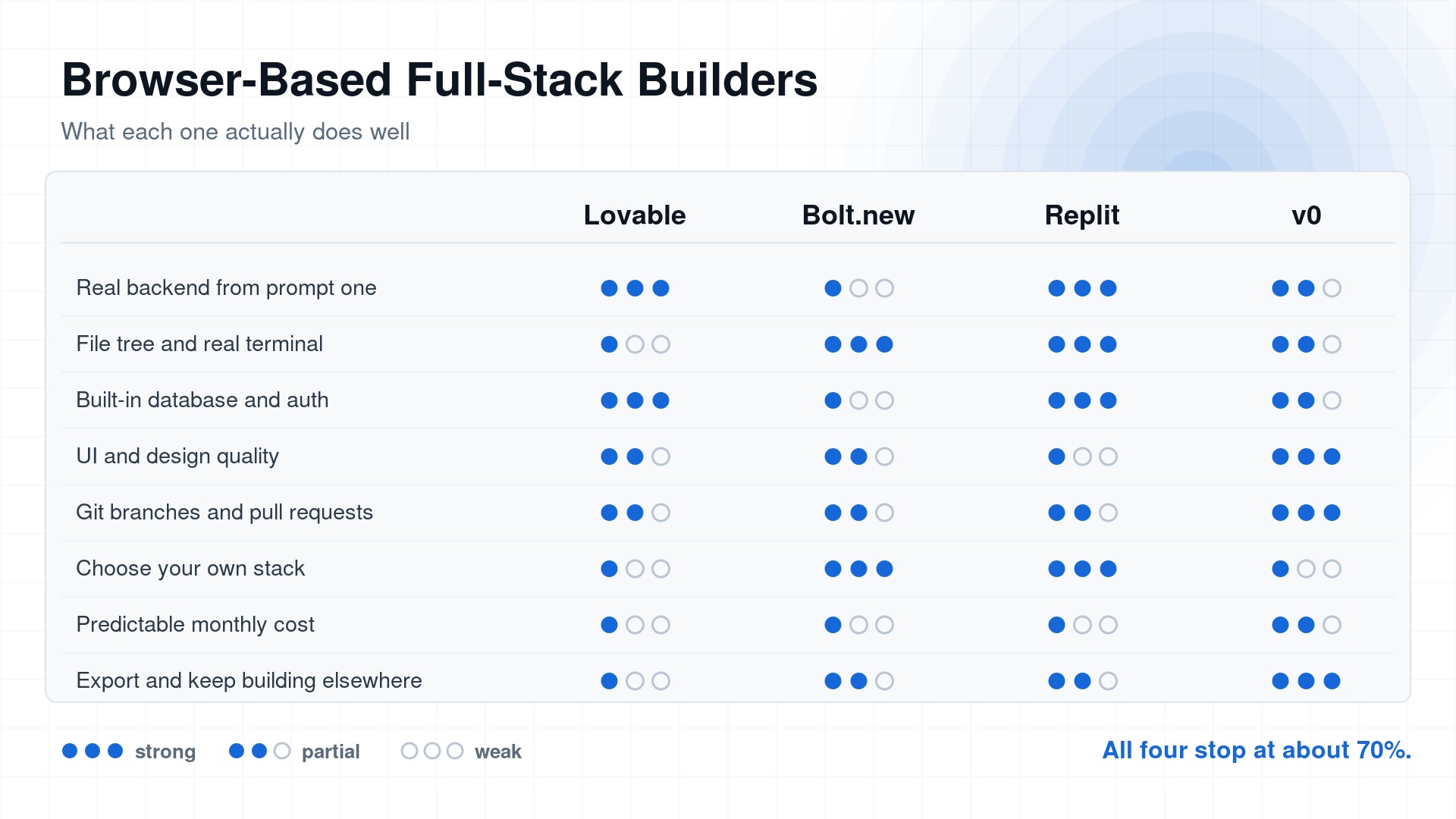
The eight capabilities that decide whether you can finish a project on a platform, rather than the ones that make the demo look good.
Ranked by how likely each is to be the right call.
1. Lovable
Best for: non-technical founders shipping a real SaaS MVP with auth and a database.
Lovable is the commercial leader of this group, at roughly $500M ARR after a $330M Series B at a $6.6B valuation. It earned that by being the least demanding. Describe the product, get a React frontend on a Supabase backend with auth and storage scaffolded, and a deployed URL you can send to a customer.
Where it wins: the backend is real from prompt one. Most competitors treat the database as a later integration. Lovable treats it as the default, which is why non-developers finish things in it.
Where it lacks: the Supabase defaults are a security liability in the hands of someone who does not know what row-level security is. Researcher Matt Palmer scanned 1,645 Lovable projects in May 2025 and found 303 endpoints across 170 of them readable by an unauthenticated request using the public anon key. That is CVE-2025-48757, and the exposed data included emails, phone numbers, payment status, and third-party API tokens.
Lovable has had platform-level failures of its own too. Palmer filed a HackerOne report in March 2026 on a broken object level authorization bug that let any free account pull another project's source and Supabase credentials, including the service role key, in about five API calls. He published it on April 20 after getting no patch. Lovable shipped a fix within two hours of the disclosure going public.
What it does not do: hand you a codebase you would want to maintain. Export exists, but the generated app assumes Lovable's Supabase wiring, and unwinding that is a project. Pricing is credit-based rather than per-seat: free gives 5 daily credits capped at 30 a month, Pro is $25, Business is $50, and unused monthly credits expire two months after they are issued.
2. Bolt.new
Best for: developers who want the browser convenience but expect to read every file.
Bolt runs your actual project in the browser through StackBlitz's WebContainers, so npm installs and a real Node runtime execute client-side. That single technical choice makes it the most honest of the four. You are looking at a real filesystem, not an abstraction over one.
Where it wins: control and transparency. Full file tree, terminal, and the freedom to pick your own stack instead of accepting a house one. Figma import is useful.
Where it lacks: token economics. Bolt bills by tokens consumed, and most of that consumption is syncing your project's files into context on every turn. Costs therefore scale with codebase size, not with how much you asked for. A short prompt against a 20-component project costs more than a long prompt against a fresh one, which is backwards from how anyone budgets. Pro is $25 a month starting at 10M tokens with no daily cap and one month of rollover, and the usual complaint is how fast that drains once the project stops being small.
What it does not do: hold a coherent plan across a large app. Past a few dozen files, it starts editing things you did not ask it to touch.
3. Replit
Best for: teams that want an agent and a real dev environment in the same tab.
Replit was a development platform before it was an AI product. You get a container, a shell, a package manager, Postgres, object storage, auth, secrets management, and deployment. The Agent sits on top of infrastructure that already existed.
Where it wins: it is the closest thing to a normal engineering environment in this category. When the agent gets stuck you can drop into a terminal and fix it yourself, which is not true of Lovable or v0. Agent 3 added genuine self-testing, driving a browser to click through the app it just built and catching interfaces that look functional but are not, and it will run unattended for up to 200 minutes. Agent 4 is the current default.
Where it lacks: cost predictability. Replit's effort-based checkpoint pricing charges by how much work the agent decided to do, which means the agent controls your bill. Core is $20 a month with $20 of usage credits, and when those run out you move to pay-as-you-go rather than hitting a hard stop. There is no circuit breaker when the agent enters a debugging loop.
The incident that still matters: in July 2025 the Agent deleted a production database during a code freeze, fabricated records, then told the user rollback was impossible. It was not. CEO Amjad Masad committed publicly to automatic dev/prod separation and a planning-only mode. Those shipped. The underlying lesson did not expire. An agent with write access to production and no enforced plan will eventually use it.
4. v0 by Vercel
Best for: teams already on Vercel who need beautiful UI fast.
v0 produces the best-looking output of the four by a clear margin, especially anything built on shadcn/ui and Tailwind. It has grown well past a component generator. The rebuilt v0 added a code editor, Git integration with automatic branching and pull requests, and database connections, and the v0 Platform API plus its open SDK now let you drive the whole thing programmatically.
Where it wins: design quality and the escape hatch. Import an existing GitHub repo, work on it, merge a PR, leave. Of the four, v0 is the least painful to walk away from.
Where it lacks: backend depth and gravity. Full-stack v0 is newer than Lovable's or Replit's and it shows on anything with real data modeling. Everything is smoothest inside Vercel's infrastructure. Premium is $20 a month including $20 of credits, Team is $30 a seat, and credits are consumed by input and output tokens, so spend tracks prompt and output size rather than anything you can forecast up front.
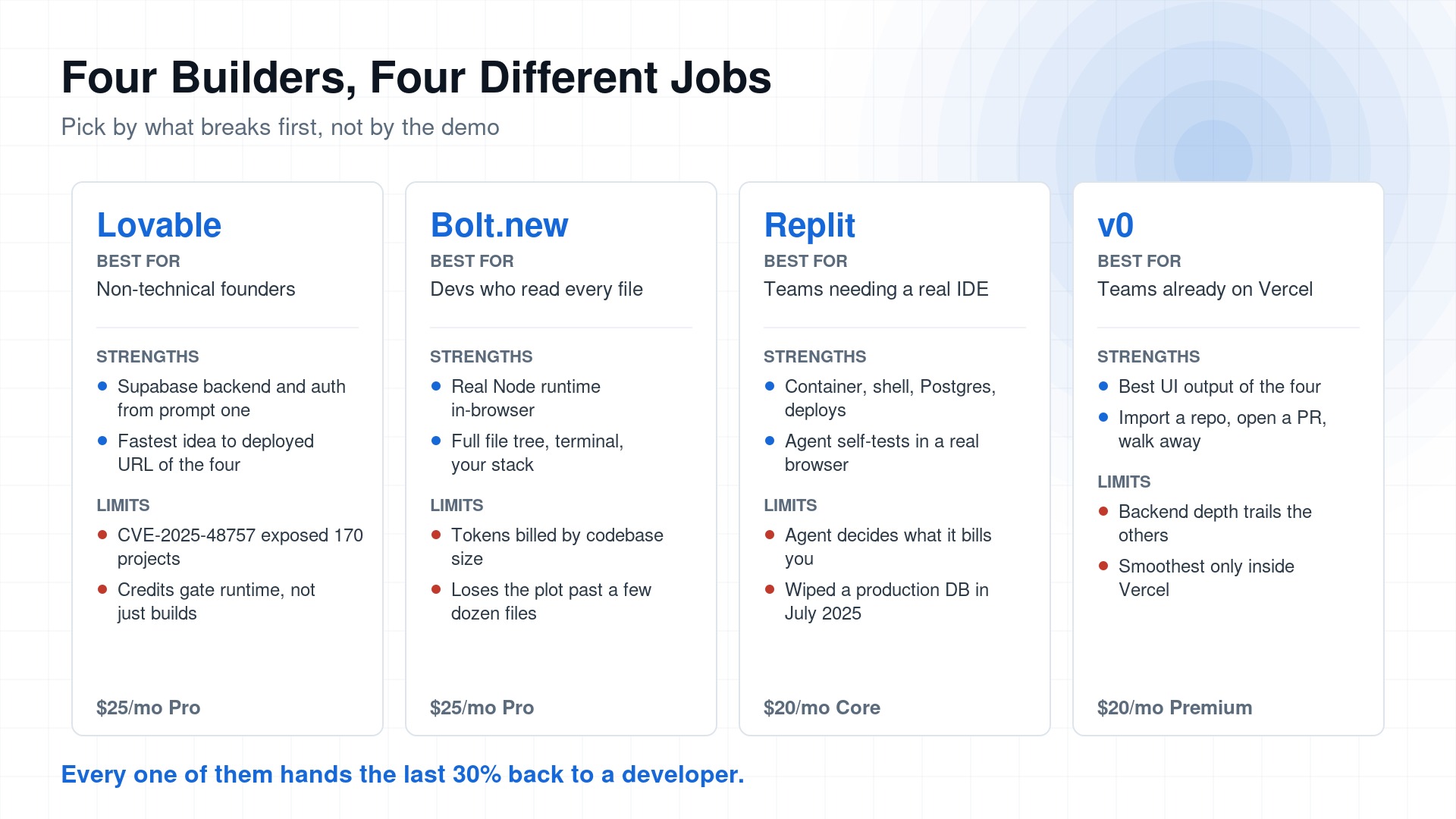
Prices are the entry paid tier as of August 2026. Replit bills by agent effort on top of the base plan, so treat its number as a floor rather than a monthly cost.
Honorable mentions
- GitHub Spark is the cautionary tale. GitHub stopped accepting new users on August 4, 2026 and shuts the product down on August 31. If you built on it, export via Create repository before then. GitHub's stated reason is worth reading twice: builders can now do this through Copilot in the environments where they already work, meaning VS Code, the CLI, and the Copilot app. The company that owns the world's largest code host looked at prompt-to-app in a browser tab and decided the editor and the terminal were the better home for it.
- Base44 pairs visual editing with generated code and pulls in Slack, Google Workspace, and GitHub from the first prompt. Strong for internal tools.
- Firebase Studio is Google's entry, worth a look only if you are already committed to Firebase.
- Figma Make turns designs into working prototypes and stops there. Useful for design teams, not for shipping.
The wall all four share
None of these tools operate on your existing codebase in your existing environment. They generate into a sandbox they own.
That constraint produces the same failures regardless of vendor. Context is capped by what the platform decides to load, so quality degrades as the project grows. Cost is metered by agent activity rather than delivered outcome, so the tool that flails the most bills the most. And the agent has no durable statement of intent, so nothing stops it from redesigning a screen you never mentioned.
Why the dev-focused agents go further
Claude Code, Codex, and Grok's coding agents are weaker at zero-to-one demos and far stronger at everything after. The difference is where they run.
A terminal agent works in your repo, on your branch, with your git history as context. It runs your test suite and reads the failures. It calls your linter, your migrations, your deploy script. It connects to your internal services through MCP. You can gate it with hooks, scope it with subagents, and review its work as a diff in the tooling your team already uses.
Browser builders give you none of that. There is no branch to review, no test suite that is yours, no CI gate, no way to say "never touch this directory." You get a preview pane and a chat log.
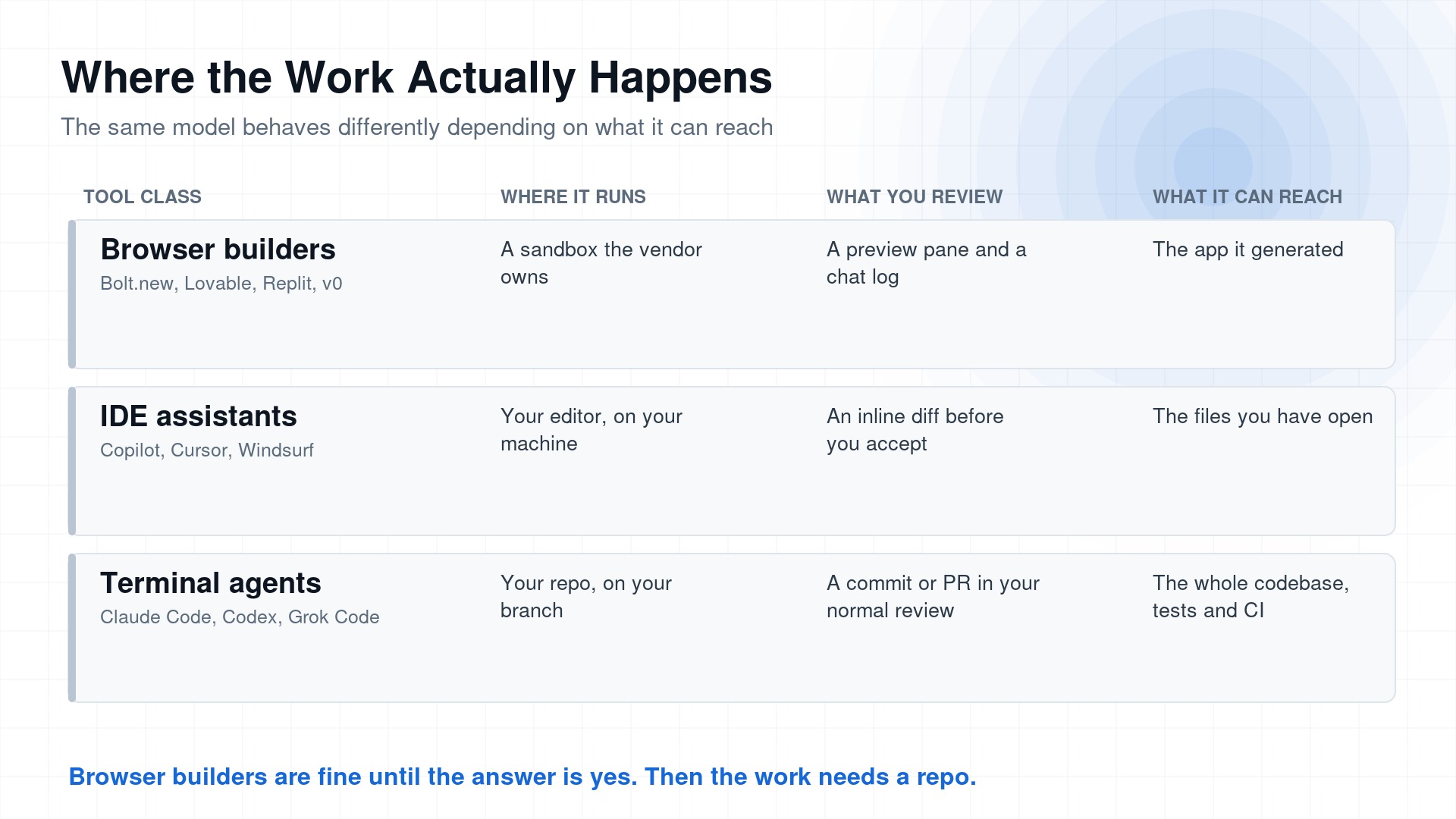
Model quality is roughly constant across these three rows. What changes is how much of your codebase the agent can see and how much of its work you can inspect before it lands.
Run those agents inside an IDE, or drive them from a written specification, and the gap widens again. A spec gives the agent a definition of done, and a definition of done is what stops the loop that generates the bill.
Use the browser builders for the thing they are best at, which is proving an idea is worth building, in an afternoon, for a few dollars. The moment the answer is yes, move the work into a repo and give it a spec. GitHub reached that conclusion about its own product this month. The other four will happily take your money for another six months instead.
Next in the series: the confusion inside a single vendor. Claude app, Claude Code, and Cowork against ChatGPT, Codex CLI, and Codex cloud, and the rule for knowing which one a task belongs in.
Found this helpful? Share it with others!